
ARES Duval GIS Command Dashboard
Node/Express and Leaflet command map for Duval County ARES with multi-source operator tracking, incidents, tasks, nearest-operator dispatch, ICS-style incident workspaces and system diagnostics.
Release
Section titled “Release”Release details
- Version
- 7.1.5
- Live deployment
- Render web service (login required)
- Server
- Node.js 20, Express 4
- Map
- Leaflet 1.9 with marker clustering, bundled locally (no CDN)
- Client build
- esbuild, 11 browser bundles
- Realtime
- MQTT (Meshtastic), APRS polling, browser Web Serial GPS
- HTTP client
- axios
- Storage
- Local JSON files on a persistent disk
- Hosting
- Render Blueprint (render.yaml), or local on the field laptop
- Tests
- Playwright UI suite (16 tests × desktop and mobile), API smoke test, GeoJSON validation
- CI
- GitHub Actions verify workflow
- Built with
- OpenAI Codex
Source: Project README, package.json, release notes and source code (repository not public)
Live deployment: ares-duval-gis-render-v2-1.onrender.com. It is protected by a login for authorized operators, so the screenshots on this page come from a local copy loaded with fictional demo data instead.
The hosted build is labeled ARES Duval GIS v3.7.2 (Development) and currently works best on a desktop browser. Its version label follows a different numbering from the local release line in the version history below (7.1.5), so treat the two as separate tracks until they are reconciled.
What the platform does
Section titled “What the platform does”The dashboard is built to support real-time situational awareness and operational decision-making for ARES Duval during activations. It pulls many sources into one operational view of Duval County, and it is designed to complement Net Control operations by making it easier to see resources, spot gaps and coordinate activity in a fast-moving environment.
One operational picture of Duval County:
- JFRD fire stations, law enforcement, hospitals and shelter locations, using official City of Jacksonville ERAT (Emergency Response) map services where they are available. If the live ERAT service is unreachable, the map falls back to locally stored, validated points.
- Flood zones, weather alerts and other hazard overlays.
- ARES and SKYWARN frequency references and repeater locations, for operators’ quick reference. (Specific frequencies are not reproduced on this website.)
- Live and fallback data integration with a priority-based system, so the picture stays usable if external feeds fail.
A lightweight command tool, not only a map:
- Operational Status Layer: operators can mark facilities as Available, Monitoring or Unavailable, and each change is timestamped.
- Action-driven interface: quick access to zoom, directions and tasking workflows from any map feature.
- Offline-aware design: cached data and low-bandwidth usability for degraded communications.
The project is still a work in progress. A future step is plugging in an operator roster with call signs, which would only be done with the group’s approval and with contact details kept off any public view.
Give a net control station or command post one map that shows where ARES operators are, what incidents and tasks are open, and who is assigned to what, no matter which radio system each operator is reporting through.
“Done” means a dashboard that:
- keeps working when some feeds are down,
- tells you honestly which feeds and providers are healthy,
- lets a dispatcher find the nearest available operator and assign them in a few clicks, and
- keeps the incident’s communications plan, message traffic and activity log next to the map.
Constraints
Section titled “Constraints”- Mixed sources: operators report by APRS, Meshtastic mesh, DMR or a manual check-in, and one person may show up on more than one of them.
- Degraded networks: upstream feeds (NOAA/NWS, FEMA, FL511, statewide outages, ArcGIS) may be unreachable during an incident. Every feed reports its own state, such as live, cached, fallback or offline, instead of failing silently.
- Validated base data first: the map always starts from locally stored, validated GeoJSON layers, and live layers are added on top when they respond.
- Security: every page and API route except the health checks requires a login. Every write also requires an admin token, and all credentials live in the host’s secret settings, never in the repository.
- Privacy: sharing your own GPS position is opt-in, off by default, and expires automatically when your browser stops sending updates.
- Persistence on a cloud host: state is plain JSON, so on Render it must live on a mounted persistent disk. The diagnostics panel warns when it doesn’t.
Architecture
Section titled “Architecture”APRS (aprs.fi API) ──────┐Meshtastic (MQTT / API) ─┤ ┌─► Operator board (filter by source and status)DMR tracker (optional) ──┼─► Tracking fusion ─────┼─► Map markers (styled by best source, source count)Manual check-ins ────────┤ (merge by call sign, └─► Nearest-operator dispatchBrowser GPS shares ──────┘ alias or node ID)
Incidents · Tasks · Assignments · Check-ins ─► JSON store (APP_DATA_ROOT) ─► Express API ─► Leaflet UINOAA / NWS · FEMA · FL511 · statewide outages · SKYWARN ─► feed cache ─► feed status and overlaysValidated local GeoJSON + official ArcGIS / HIFLD layers ─► layer service ─► Layers drawer and mapTracking fusion
Section titled “Tracking fusion”- Merges APRS, Meshtastic, DMR, manual check-ins and opt-in browser GPS shares for the same operator. It matches on call sign, APRS call sign, Meshtastic node ID or DMR ID.
- Meshtastic nodes whose long or short name contains a ham-style call sign are matched to that operator.
- Each merged marker shows a source count and badges, and is styled by its best current source.
- Positions older than the stale threshold (6 hours by default) are marked stale.
- Refreshes run as one unified cycle and report partial success, so one failing provider doesn’t blank the others.
- Fused reads are recalculated from the current raw operator records. An earlier cached version made new assignments look unsaved.
Dispatch and the assignment lifecycle
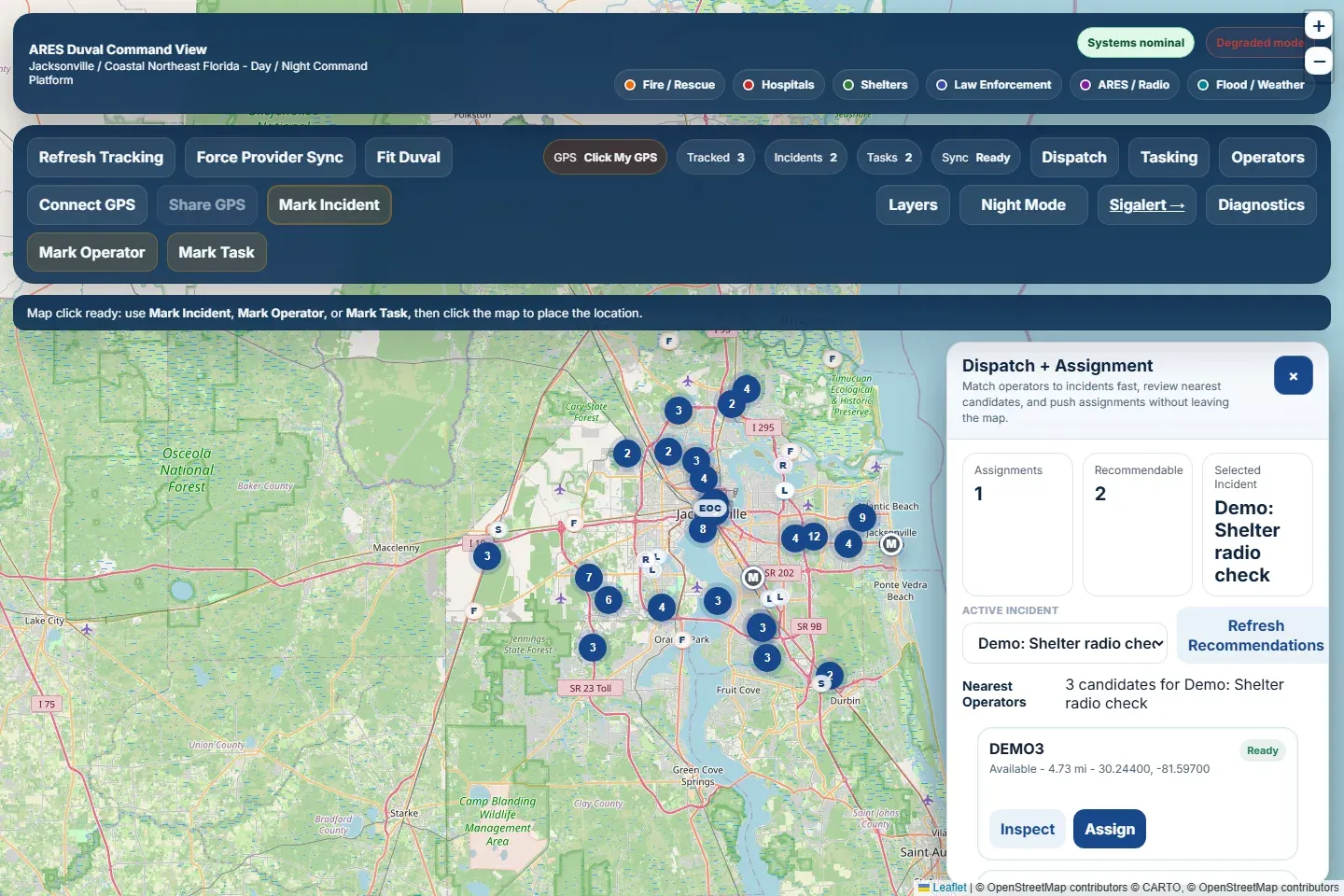
Section titled “Dispatch and the assignment lifecycle”- Nearest operators: for any incident, the dashboard ranks operators by straight-line distance in miles. It also shows how long ago each one last checked in and whether they are eligible for dispatch. Operators who are available, monitoring, en route or on scene are eligible. Anyone offline, unavailable or already assigned to another incident is not.
- Assignments: dispatch writes the assignment to the operator record first, then refreshes tracking so every view updates quickly. Each assignment is logged as an event and drawn on the map as a line from the operator to the incident.
- Lifecycle: operators move through statuses such as available, assigned, en route, on scene, needs relief and released. Inline controls reassign or release an operator without leaving a stale incident link behind.
Incident workspace (ICS-style)
Section titled “Incident workspace (ICS-style)”Each incident carries more than a map pin:
| Area | Fields |
|---|---|
| Incident record | Title, type, status (default “monitoring”), priority (high for active incidents, otherwise medium), location |
| Workspace | Operational period, incident commander, net control, primary and tactical channel, staging location, objectives, situation report |
| Communications plan | Assignment, function, channel, tone, mode, operator, notes, status (planned by default), primary flag |
| Message log | From, to, precedence (routine by default), subject, body, status, reply expected, sent via |
| Activity log | Author, activity, resource, location, operational period |
The communications plan, message log and activity log can each be added to, edited and deleted from the dashboard.
Map layers
Section titled “Map layers”The layer service loads 28 layers in six categories: infrastructure, operations, weather, transportation, statewide and reference. Validated local layers load first, and live official layers are added when they respond.
| Validated local layers (features) | Live and official layers |
|---|---|
| Fire Stations (16) | Hospitals, JFRD Stations, Police Stations, Shelters and Flood Zones (official ArcGIS) |
| Hospitals (15) | JFRD Coverage Visualization |
| ARES Fixed Sites (2) | Florida Power Outages |
| Duval ARES Zones (7) | NOAA / NWS Alert Polygons |
| EOC (1) | FHP Duval Station, Official JSO Substations |
| Repeaters (9) | ARES Repeater Sites, Official COJ Shelter Sites |
| Shelters (9) | FL511 Message Boards and Traffic Cameras |
| Major Bridges (9) | FEMA Flood Zones |
| Major Intersections (12) | Fire Stations, Hospitals and Shelter Facilities (live HIFLD) |
| Training Sites (5) |
Reference data
Section titled “Reference data”- Data validation summary: 100 reference records across 5 layers: 14 hospitals, 1 EOC, 7 shelters, 68 fire stations and 10 repeater sites. 38 are validated against official sources and 62 are flagged for manual review, mostly official addresses that still need geocoding and repeater sites that still need confirmation.
- JFRD station directory: 68 stations.
- Hospital directory: 14 hospitals.
- Other reference sets: official shelters, JSO substations, the FHP station and repeater sites.
- Preparedness cards: drawn from the City of Jacksonville Preparedness and Response Guide.
- ARES frequency reference: a channel reference drawer for operators. Channel details are not reproduced on this site.
Live feeds
Section titled “Live feeds”| Feed | Source |
|---|---|
| Weather alerts | NOAA / NWS Alerts API and Points API |
| Disaster declarations | FEMA OpenFEMA API |
| Traffic, message boards and cameras | FL511 (API key optional; public map fallback) |
| Statewide power outages and resources | Florida Power Outages ArcGIS layer plus the state GATOR reference |
| Severe weather spotter information | NWS Jacksonville SKYWARN |
The sources policy is “live-preferred”: live feeds and official layers are always used when they respond, with validated local data as the fallback.
Screen tour
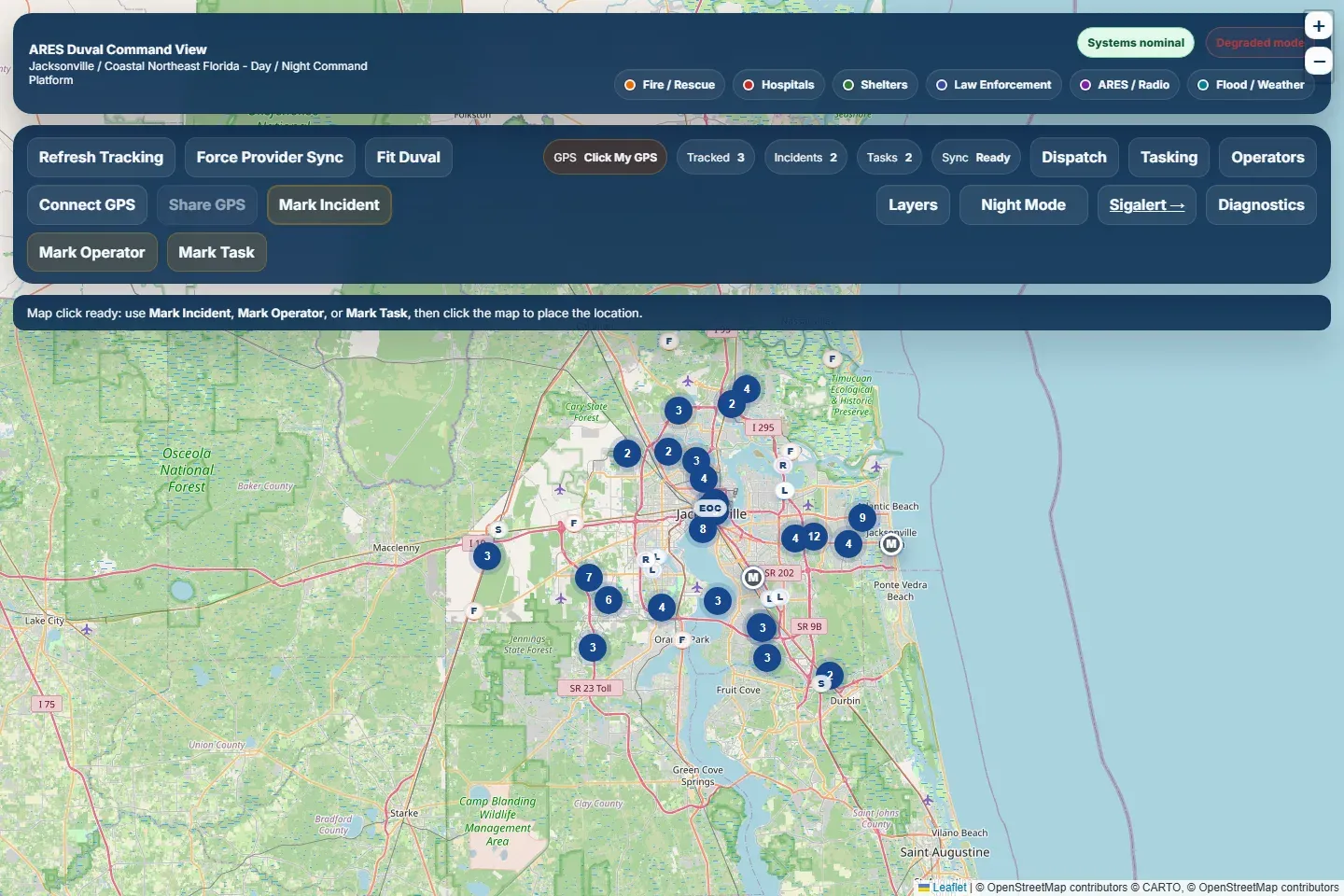
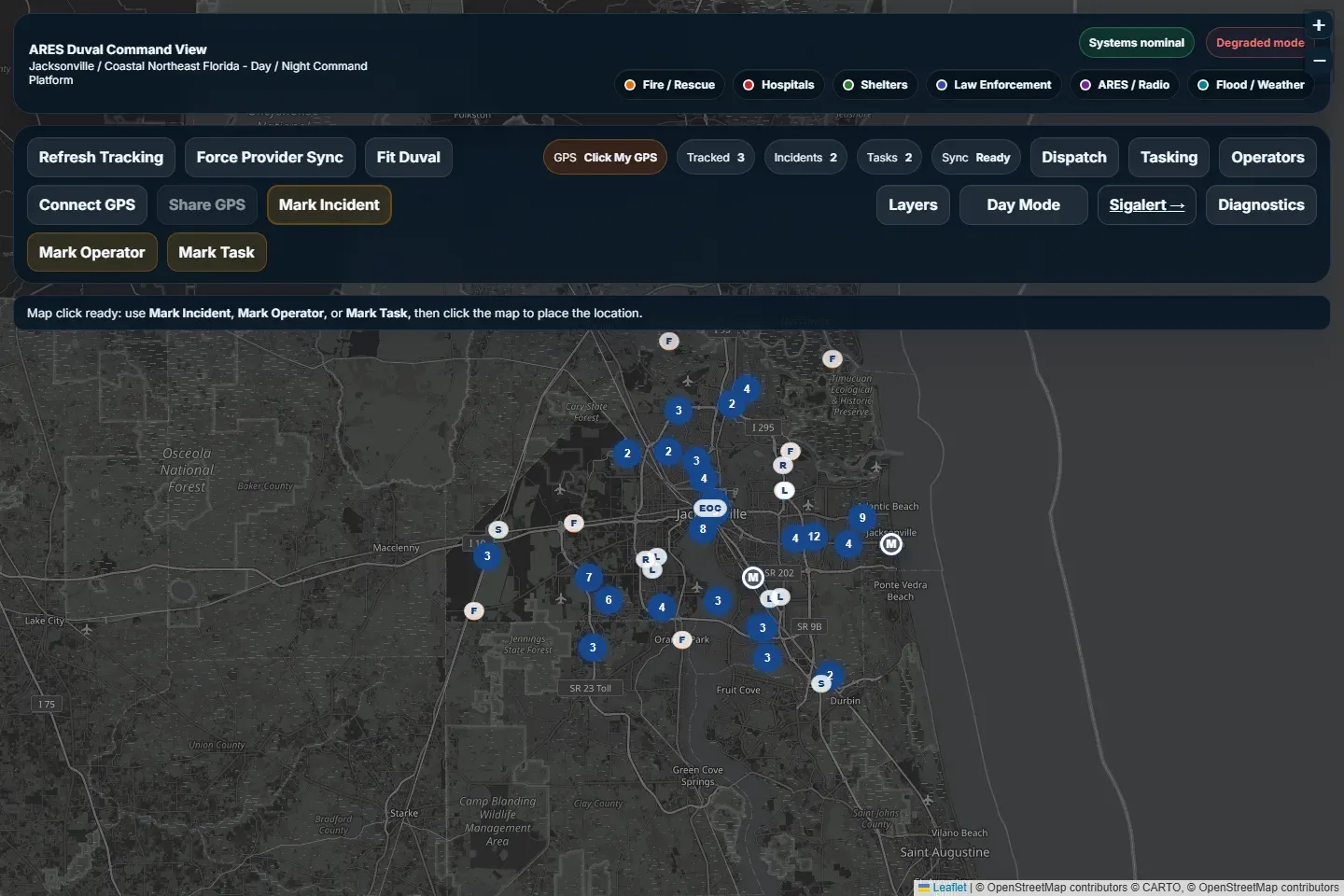
Section titled “Screen tour”- Top bar: Overview, Ops, Tasking and System views, Night Mode, Fit Duval, Locate Me, and a startup diagnostics chip.
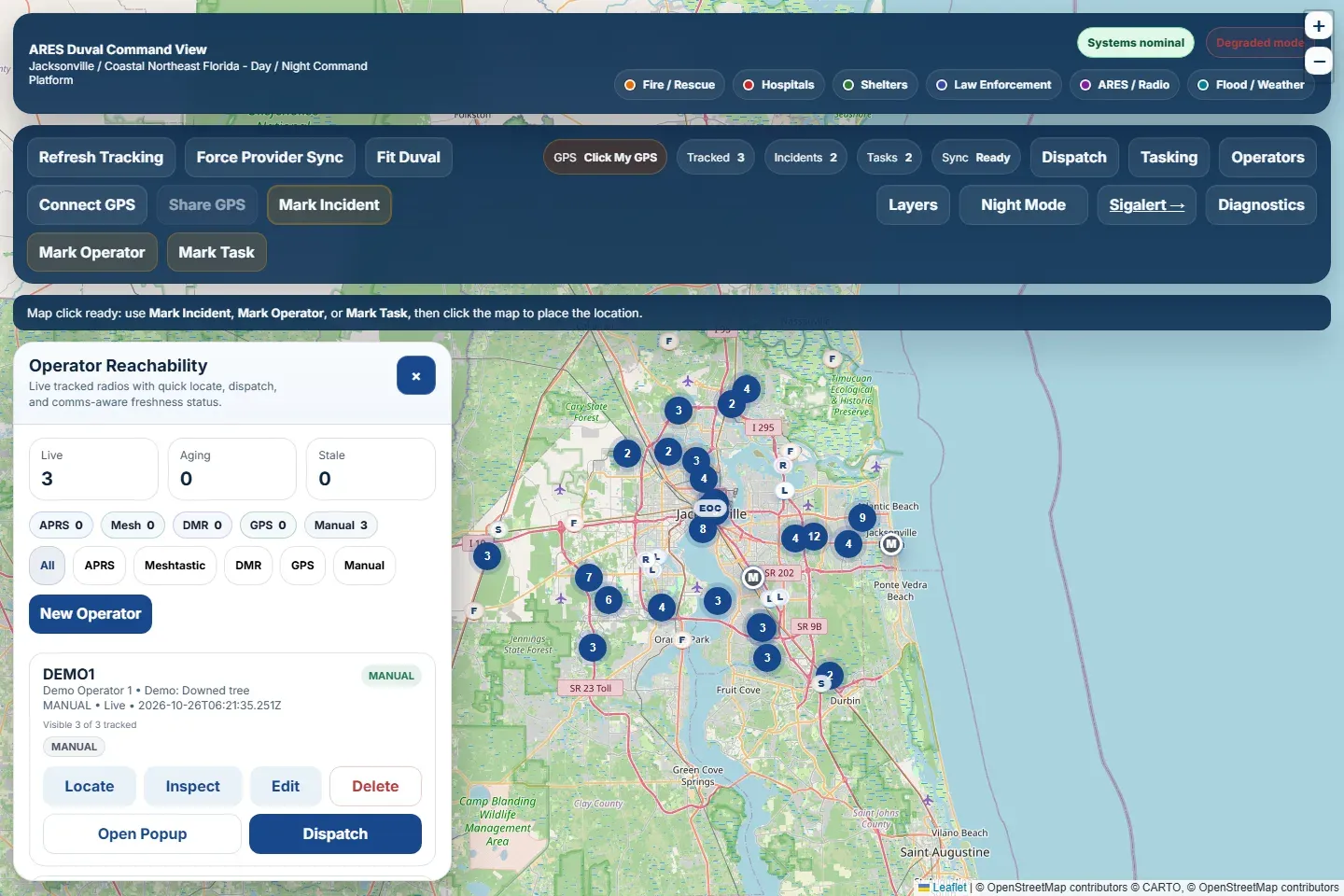
- Operator Board: filter by source (All, APRS, Meshtastic, DMR, Manual) and by status (Available, Assigned, En Route, On Scene, Needs Relief, Stale). It also has an operator reachability view and an add-operator form.
- Dispatch Console: incident queue, focus card, nearest operators, quick recommendations and recent assignments.
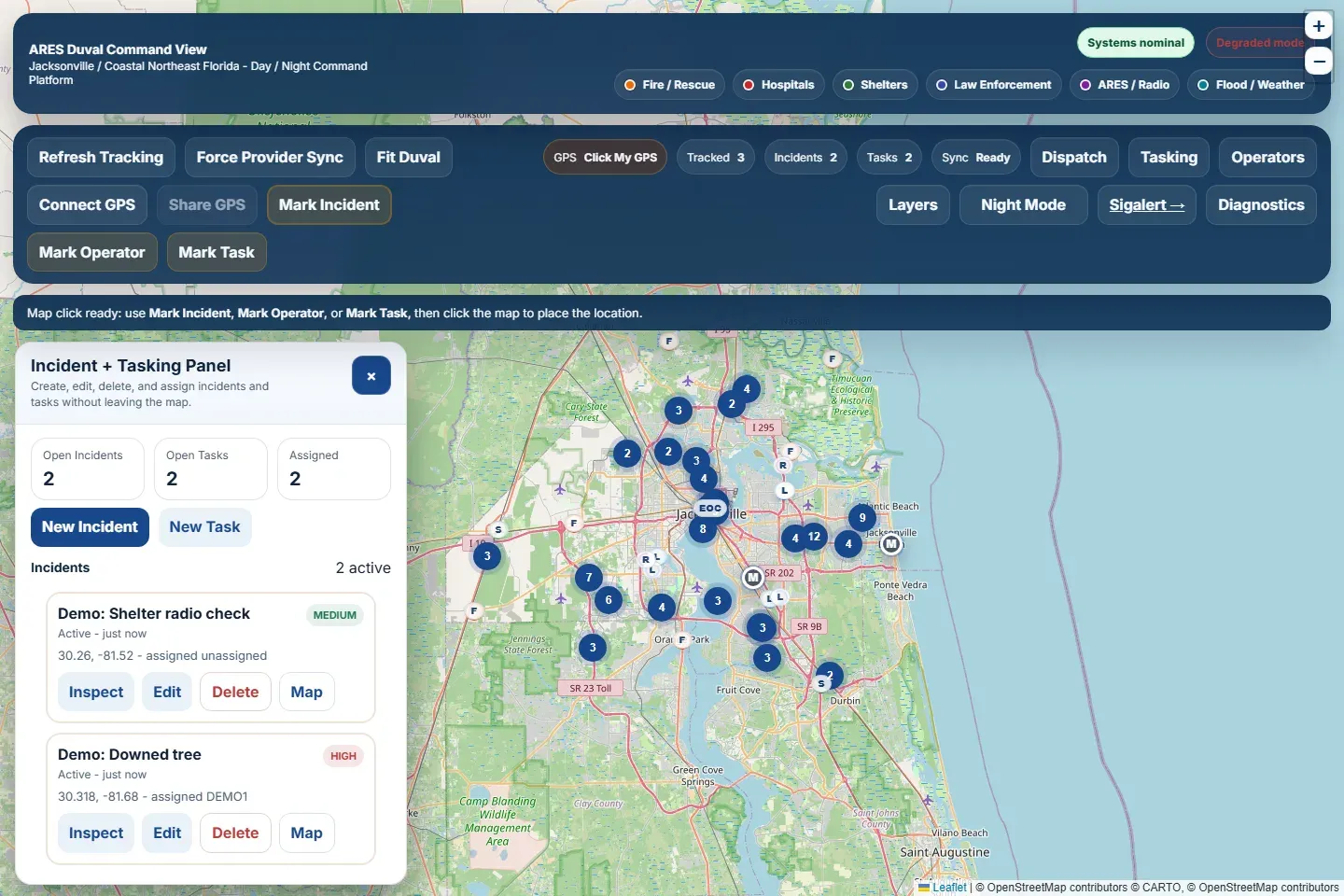
- Incident and Tasking panel: new incident, new task, task board, and mark-on-map tools for incidents, operators and tasks.
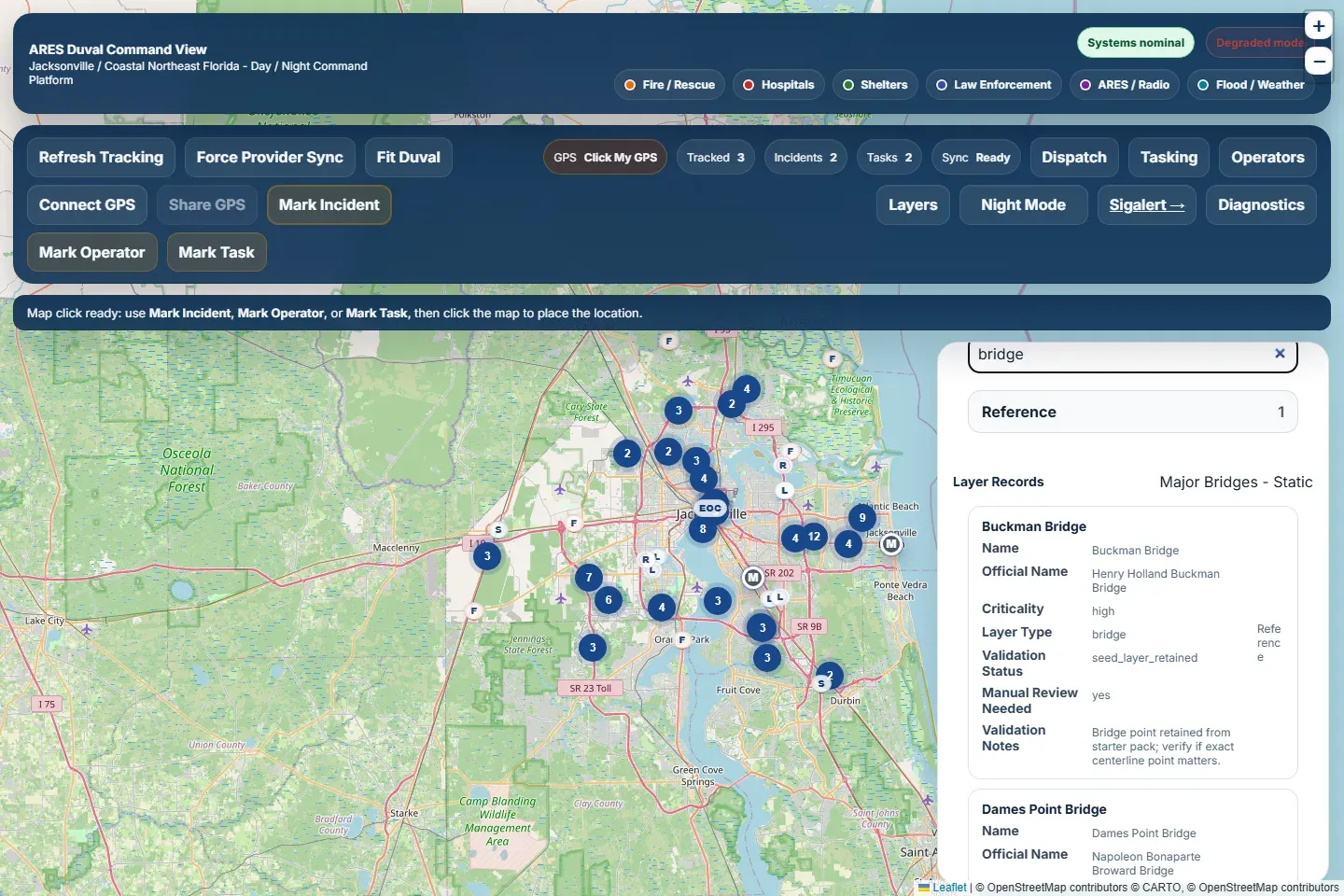
- Search and Operational Layers: layer search, category accordions, show and hide toggles, and browsable layer records.
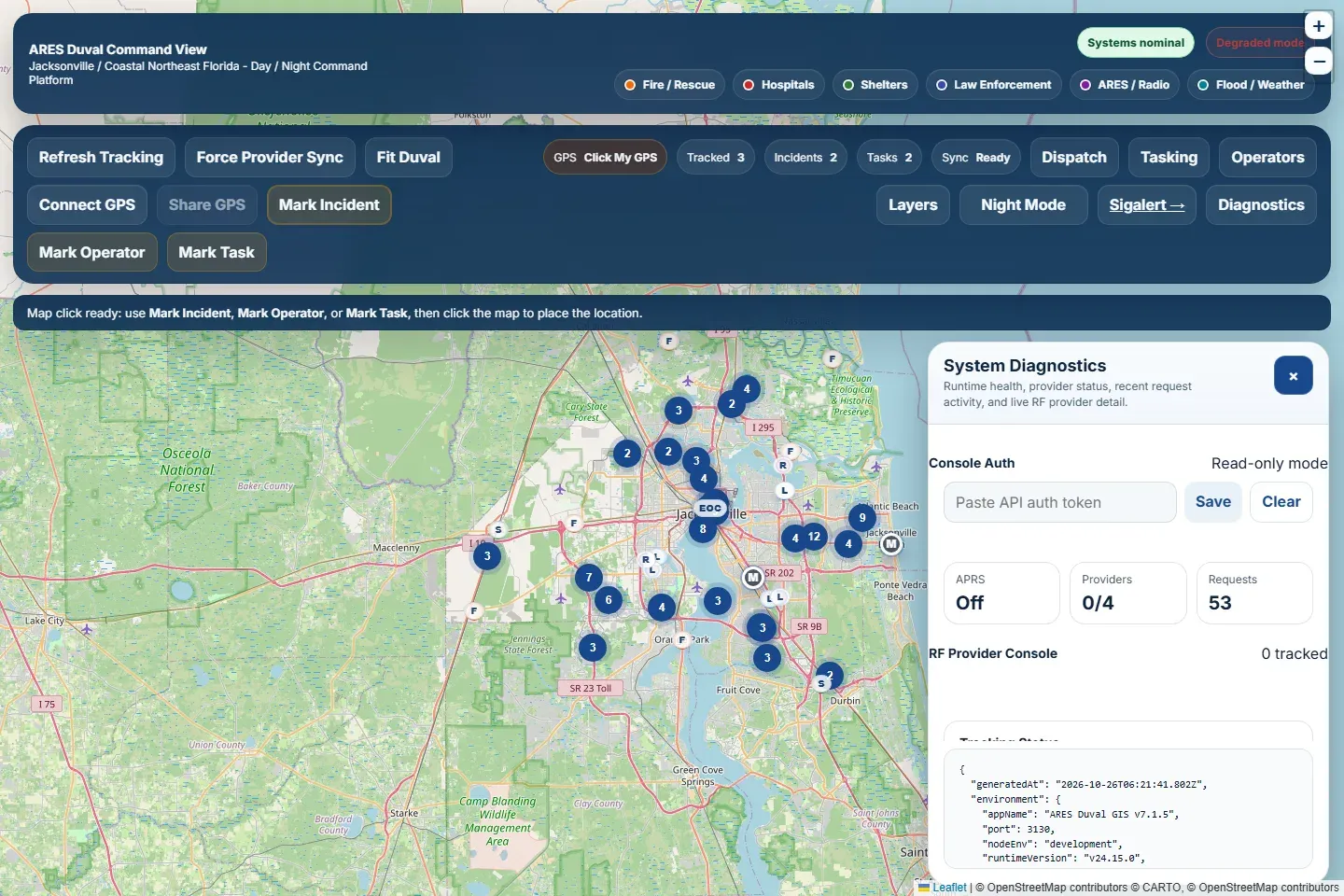
- System Diagnostics: environment and persistence checks, the RF provider console, live RF tracking, feed and agency status, validation summary, force provider sync, and a downloadable diagnostics snapshot.
- GPS: My GPS (Web Serial at 9600 baud), Share GPS and Locate Me.
- Console Auth: enter the admin token used for writes. Tests confirm that clearing it blocks writes everywhere.
Screenshots
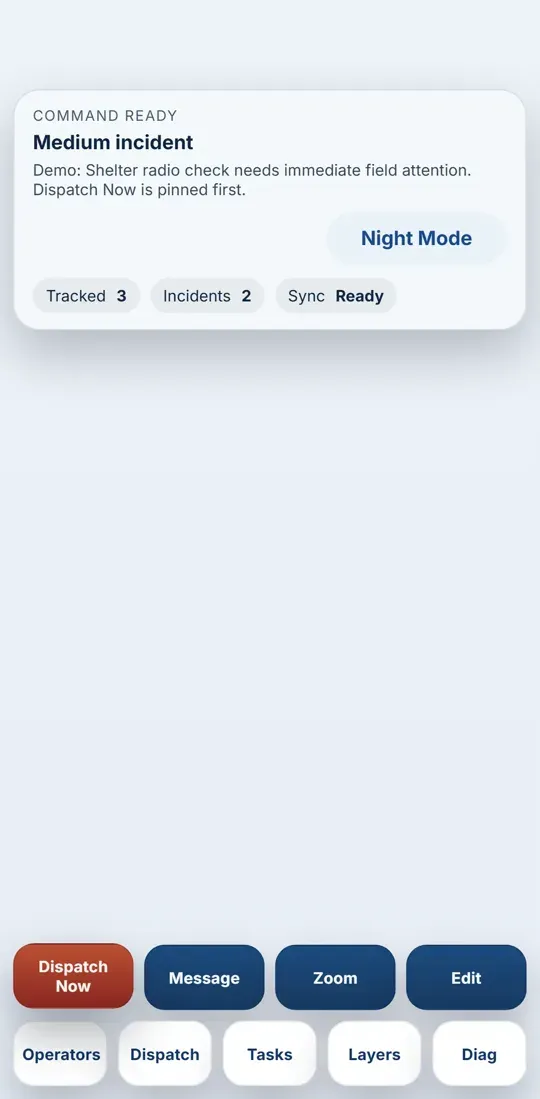
Section titled “Screenshots”These screenshots come from a local copy of version 7.1.5 on the CF-33, captured on 2026-10-26. It was loaded with fictional demo data only: operators DEMO1 to DEMO3, two “Demo:” incidents in Jacksonville and two demo tasks. Carto tile requests were blocked so the map shows the app’s built-in OpenStreetMap fallback (see Testing). Before publishing, every image was checked for real names, call sign lists, phone numbers, addresses, credentials and file paths. Two candidate shots were thrown out because they showed real repeater call signs and hospital contact details.
All routes except the health checks need a login. Routes marked “admin” also need the admin token.
| Area | Routes |
|---|---|
| Health | GET /healthz, GET /api/health |
| Config | GET /api/config (map center and county bounds) |
| Operators | list, create (admin), update (admin), delete (admin), check-ins list and create (admin) |
| Incidents | list, get, create, update and delete (admin), plus add, edit and delete entries in the comms plan, message log and activity log (admin) |
| Tasks | list, get, create, update and delete (admin) |
| Dispatch | nearest operators for an incident, create assignment (admin), assignment history, assignment lines as GeoJSON |
| Tracking | health, diagnostics, refresh, poll, fused operators (JSON and GeoJSON) |
| GPS | status, position (JSON and GeoJSON), shares list, start share, stop share, restart serial reader (admin) |
| Layers and reference | layer list, layer records, reference sets, FL511 camera image proxy |
| Feeds and sources | cached feeds, refresh (admin), source integrity, refresh (admin) |
| System | diagnostics, downloadable snapshot |
Parts list
Section titled “Parts list”| Part | SKU | Price paid | Key specs | Source | Status |
|---|---|---|---|---|---|
| Field laptop with u-blox GNSS receiver | TBD | TBD | NMEA over USB serial at 9600 baud | TBD | TBD |
| Render web service and persistent disk | TBD | TBD | Starter plan, 10 GB disk (from render.yaml) | TBD | Installed |
Configuration
Section titled “Configuration”Configuration is environment-driven. The repository ships an example file with placeholder values only.
- Security: basic authentication on, a non-default username and password set in the host dashboard, and a generated admin API token.
- Persistence: the app data root points at the Render disk mount, so operators, incidents, tasks and check-ins survive restarts and redeploys.
- Tracking: tracking on, with a 20-second render interval and a 6-hour stale threshold.
- Providers: APRS, Meshtastic and DMR are each off by default and are turned on only after their credentials and endpoints are configured. APRS polling uses caching, batch limits and a rate-limit backoff.
- GPS: server-side serial GPS is for local Windows use only. Cloud deployments leave it off and use the browser’s Connect GPS button instead.
- GPS sharing: on, with a 2-minute expiry.
Build steps
Section titled “Build steps”npm ci. The install also builds the browser bundles.npm start, then open the dashboard locally.- Optional:
npm run seed:datafor sample data. This overwrites the local data folder. - For hosting, create a Render Blueprint from the repository, set the secret values Render asks for, and deploy. The health check path is
/healthz.
Testing and verification
Section titled “Testing and verification”| Area | Status |
|---|---|
| Playwright UI suite, local run on the CF-33 (May 2026) | All 32 runs failed, but no test body ran. Playwright’s Chromium browser had never been installed on the laptop (npx playwright install chromium). |
| Playwright UI suite, cloud run (2026-10-26, Linux, Chromium) | 16 passed, 14 skipped by design (desktop-only or mobile-only tests). The 2 visual-baseline tests could not be compared because their reference images exist for Windows only. |
| API smoke test (2026-10-26, Linux) | Passed |
| GeoJSON validation (2026-10-26, Linux) | Passed (all layers) |
| Playwright UI suite on the CF-33 after installing the browser (2026-10-26, Windows, Node 24.15, Playwright 1.59.1, isolated temp data folder) | 16 passed, 14 skipped by design, 2 failed. Both failures are the visual-baseline checks, and neither comes from the app’s own logic (see below). The API smoke check in the same run passed. |
| Live deployment reachability (2026-10-26) | /healthz returned 200. / returned 401 and asked for a login, as designed. |
| GitHub Actions verify workflow | Present in the repository; latest result not recorded here |
| Live APRS, Meshtastic and DMR feeds | Depend on runtime credentials and upstream availability; not verified for this page |
The two visual failures on Windows:
- Desktop day map: 742,589 pixels differed (54%, against a 3% limit). The Carto basemap tiles now return a normal success response with a small “API key required” placeholder image instead of map tiles. Because nothing errors, the app never switches to its OpenStreetMap fallback. The day and night Carto styles both do this, so the hosted site’s basemap is likely affected too.
- Mobile day map: 26,068 pixels differed (8%). On a Pixel 7-sized screen the map area is 0 pixels wide, so no map draws. The stored Windows reference image for this test turned out to be an app error screen, so it was never a valid baseline.
No baselines, source files or test files were changed during this run. The screenshots below were captured with Carto tile requests blocked, so the app used its built-in OpenStreetMap fallback.
The 16 UI tests cover:
- The authenticated map shell
- Day and night map visuals, on desktop and mobile
- Theme toggle and the core drawers
- Mobile shell controls and compact mode
- Mobile dock quick actions
- Mobile incident, dispatch and task workflows
- Rejecting a bad login on the API
- The diagnostics drawer
- Auth consoles staying in sync, and writes being blocked when the token is cleared
- The layer browser
- Inspecting records and opening the matching map popups
- Reassigning and releasing operators
- The full create, update, dispatch and delete cycle for an incident
Safety notes
Section titled “Safety notes”- This is a situational awareness tool, not a dispatch system of record. Follow the served agency’s procedures.
- Position data is only as current as each source. Stale positions are marked, and a position should never be treated as confirmed without a radio check.
- Keep the dashboard behind authentication. Operator positions are sensitive during an incident.
Lessons learned
Section titled “Lessons learned”- Fused tracking has to recalculate from the current raw operator records. Returning a cached operator view made dispatch assignments look like they had not saved.
- An auth layer that quietly leaves routes open when settings are missing is worse than no auth layer. The middleware now rejects unauthenticated requests even when the auth settings were left out.
- Showing each feed’s health on screen matters more than adding another feed.
- A failing test suite is not always a failing app. Read the first error before fixing code. Here, the browser had simply never been installed.
Open items
Section titled “Open items”- Record a fully green Playwright run on Windows, including the visual baselines.
- Replace approximate station coordinates with authoritative county GIS data, and work through the 62 manual-review records.
- Decide whether the repository will be public.
- Make OpenStreetMap the primary basemap (or add a Carto API key), and treat a placeholder tile as a failure so the fallback triggers. Then refresh the visual baselines.
- Fix the 0-width map in the mobile layout and capture a valid mobile baseline.
- Reconcile the hosted build’s version label (v3.7.2 Development) with the local 7.1.x release line.
- Walk ARES Duval leadership through the platform and collect feedback on how it fits activations and exercises.
Version history
Section titled “Version history”Taken from the release note files in the project folder.
| Version | Change |
|---|---|
| 6.5.1 to 6.5.2 | Operator edit and save fix; operator pin popup |
| 6.6.0 to 6.6.4 | Manual check-in status board; tracking restore and operator pin fix; Meshtastic defaults; live tracking console restore; mobile sidebar console fix |
| 6.7.0 to 6.7.5 | System diagnostics persistence; tracking provider fix; APRS hardening and per-call-sign retry; environment normalization; APRS TLS hardening; strict anonymous Meshtastic |
| 6.7.8 to 6.7.9 | APRS rate limiting and Meshtastic tester; WebSocket-first Meshtastic; port binding fix |
| 6.8.1 to 6.8.9 | APRS-first production polish; operator status dispatch; Meshtastic public map API integration; full-repo diagnostic build; Command Edition UI |
| 6.9.0 | Multi-source fusion engine (APRS, Meshtastic, DMR, manual) with source filters, counts and badges |
| 6.9.1 to 6.9.9 | Incident tasking command layer; night ops visuals; dispatch assignment system; UI stabilization; layer, search and inspect fixes |
| 7.0.1 to 7.0.9 | Command Layers drawer and realtime UX; source integrity restore; layer propagation fix; operator assignment and inspect fixes; full-repo fixes |
| 7.1.0 | Clean architecture: strict auth on protected routes; assignments reflected on operators immediately; data layer and live feed engine |
| 7.1.1 to 7.1.3 | Mobile UI and UX optimization; map rendering correction; build fixes |
| 7.1.4 to 7.1.5 | Opt-in browser GPS sharing and the current diagnostics (from the README and settings; no separate release note) |
Changelog
Section titled “Changelog”Project page published.
Rollback: Revert the commit that added this page.
Expanded with the live deployment, architecture, workflows, layers, API, root cause of the test failures and version history.
Rollback: Revert the commit that expanded this page.
Added the hosted v3.7.2 feature overview, the Windows Playwright results and eight demo-data screenshots.
Rollback: Revert the commits that added them.