
SaniGLAZE Franchise Media Asset Library
An internal application that gave franchise members self-service search and access to corporate marketing assets in the company's HubSpot file store, with tools for before-and-after images, client-specific media packages, and library maintenance.
At a glance
- Full title
- Franchise Media Asset Library & Distribution Platform
- Organization served
- SaniGLAZE International franchise network and corporate team
- My role
- Vice President of Marketing, SaniGLAZE International
- Built
- 2026
- Usage
- Used by the franchise network nationwide
- Category
- Business Systems · Marketing Operations · Platform Integration · AI-Assisted Development
- Project type
- Internal business application · Not publicly accessible
- Users
- Franchise members, corporate marketing personnel, authorized administrators
- Delivery
- Browser-based application running on a hosted server
- Integration
- Existing corporate HubSpot file store, through an authenticated API
- Defining constraint
- Media files stayed in the corporate file store; no duplicate media repository
- Franchise tools
- Searchable library · Before-and-after image creation · Client-specific media packages
- Administrative tools
- Duplicate-file identification · Remote file renaming
- Development approach
- AI-assisted software development using OpenAI Codex
- Public demo
- None. Internal application; no live link exists
- Current status
- Not known
- Last updated
- October 31, 2026
Source: Project description by William A. Atkins
Overview
Section titled “Overview”The Franchise Media Asset Library & Distribution Platform was an internal, browser-based application that gave SaniGLAZE International franchise members self-service search and access to corporate marketing assets kept in the company’s HubSpot file store. It added tools for creating before-and-after images, assembling client-specific media packages, and maintaining the library itself.
I built it in 2026 as Vice President of Marketing at SaniGLAZE International, and it was used by the company’s franchise network nationwide.
The application was built around the company’s existing content system rather than beside it. Media files stayed where the corporate team already kept them, and the application retrieved them on demand through an authenticated API integration. That one decision shaped the rest of the design: franchise members got a single place to find and prepare approved materials, and the corporate team kept a single library to maintain.
Internal tool, public write-up
This application was built for SaniGLAZE International’s franchise network and corporate team. It was never a public website, and no public demonstration or live link exists.
This case study describes my design and development contributions at a functional level. Proprietary data, credentials, and confidential implementation details are excluded.
Executive Summary
Section titled “Executive Summary”| Question | Answer |
|---|---|
| What was it? | An internal web application that put SaniGLAZE’s corporate marketing library in front of the franchise network in a searchable, self-service form. |
| Who used it? | Franchise members across the nationwide franchise network, corporate marketing personnel, and authorized administrators. |
| When and in what role? | Built in 2026, while I was Vice President of Marketing at SaniGLAZE International. |
| What problem did it address? | Franchise members needed an easier way to find and use approved collateral, and the corporate team needed a way to provide it without maintaining a second copy of the library. |
| What made the design distinctive? | It left every media file in the existing HubSpot file store and retrieved assets on demand, so the corporate store remained the single source of truth. |
| What could users do beyond finding files? | Combine two photos into a before-and-after image, assemble client-specific media packages for download, and (for authorized staff) identify duplicates and rename files at the source. |
| What was my role? | I defined the requirements, users, workflows, and architectural constraint, and I built the application through an AI-assisted development workflow with OpenAI Codex. |
| What results are claimed? | The application was used by franchise members nationwide. No usage counts, time savings, or other measurements are claimed; the remaining benefits on this page are the application’s intended purpose. |
1. Role and Context
Section titled “1. Role and Context”I designed and built this application in 2026 while serving as Vice President of Marketing at SaniGLAZE International. It served three groups: franchise members, corporate marketing personnel, and authorized administrators. It was an internal tool, not a public website, and it was used by the franchise network nationwide.
As the executive responsible for marketing, I worked with both sides of the problem: the corporate team that maintained the collateral and the franchise members who needed to use it in the field.
I defined what the application needed to do, who it served, and how each workflow should work. I also set its central design constraint: the media files would stay in the company’s existing HubSpot file store instead of being copied into a new repository.
I implemented the application through an AI-assisted software development workflow using OpenAI Codex, which helped write and modify the code. The problem framing, feature scope, integration approach, and business rules were my decisions.
Where the AI-assisted workflow fit
Section titled “Where the AI-assisted workflow fit”| Area | My responsibility | Role of OpenAI Codex |
|---|---|---|
| Business problem | Recognized what franchise members and the corporate team needed from the media library | None |
| Users and access | Defined the three user groups and which tools belonged to franchise members versus authorized staff | None |
| Architecture | Set the constraint that media stays in the corporate HubSpot file store and is retrieved on demand | None |
| Feature scope | Chose the capabilities: searchable library, before-and-after images, client packages, duplicate identification, remote renaming | None |
| Implementation | Directed the build and turned requirements into working features | Assisted with writing and modifying application code |
| Delivery | Delivered a hosted, browser-based internal application | Not claimed |
What is not claimed about the development process
The exact sequence of prompts, iterations, debugging sessions, tests, code reviews, and deployments is not documented, so none is described here. Codex is credited only with assisting implementation, not with conceiving, deploying, or operating the system.
2. The Problem
Section titled “2. The Problem”SaniGLAZE’s marketing collateral lived in the corporate HubSpot file store. That collection covered videos, sales brochures, technical data sheets, safety data sheets (SDS), before-and-after photographs, and other marketing materials. Franchise members needed these materials to market and sell in their own territories, and the corporate team needed to keep the collection organized.
The application was designed to address four points of friction.
Locating assets
Section titled “Locating assets”Franchise members needed a simple, browser-based way to find the right brochure, data sheet, SDS, video, or photo without relying on the corporate team to locate it for them. A library is only useful to a distributed network if the people in the field can find what is in it.
Avoiding a second library
Section titled “Avoiding a second library”The obvious alternative, copying the collateral into a separate portal, would create a duplicate repository that had to be kept in step with the corporate original. Every new upload, replacement, or rename would have to happen twice, and any gap between the two copies would put outdated material in front of franchise members.
Preparing materials for a client
Section titled “Preparing materials for a client”Franchise members needed to present before-and-after results and assemble the right set of documents for a specific client. Both tasks are slow when every file has to be found, downloaded, and combined by hand.
Maintaining the collection
Section titled “Maintaining the collection”Corporate personnel needed practical tools to find duplicate files and correct file names in the shared store, so that the library franchise members searched stayed clean and consistent.
Who felt the friction
Section titled “Who felt the friction”| User group | What they needed | What the application was designed to provide |
|---|---|---|
| Franchise members | Fast, self-service access to approved collateral, plus ways to prepare it for a specific client | Searchable library, on-demand access, before-and-after images, client packages |
| Corporate marketing personnel | A way to serve the network without a second library to maintain | Self-service access built on the existing corporate file store |
| Authorized administrators | Tools to keep the shared store organized | Duplicate-file identification and remote file renaming |
3. What I Built
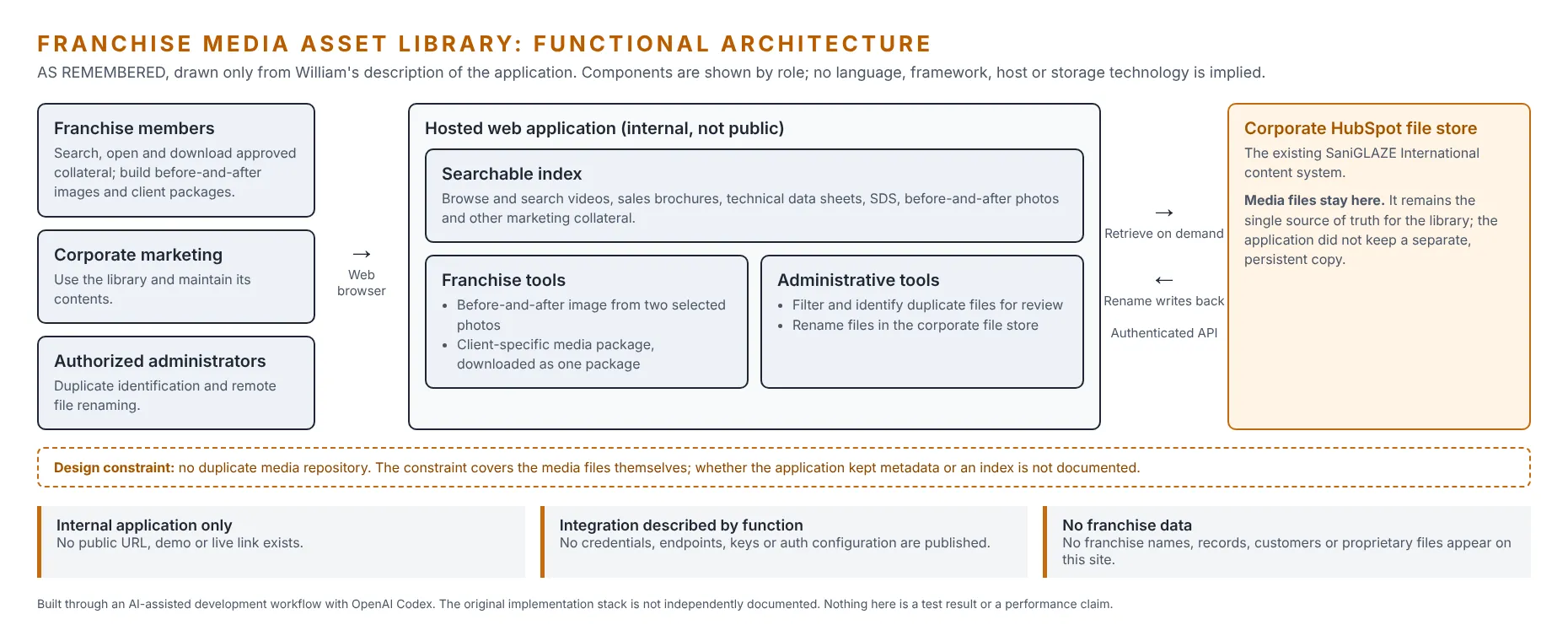
Section titled “3. What I Built”I built a hosted web application that acted as a search and access layer in front of SaniGLAZE’s existing HubSpot file store.
Franchise members opened the application in a browser, searched or browsed an indexed catalog of corporate media, and opened or downloaded the assets they needed. The application retrieved each asset from HubSpot through an authenticated API integration rather than serving it from a separate copy, so HubSpot remained the single source of truth for the media files themselves.
On top of that library, I built two sets of tools:
- Franchise tools let members combine two photographs into a single before-and-after image and assemble a client-specific collection of assets for download as a package.
- Administrative tools let authorized corporate personnel identify duplicate files and rename files in the HubSpot file store directly from the application.
The result was one place where franchise members could find, prepare, and take away approved marketing materials, and where the corporate team could maintain the library those materials came from.
How it fit into the existing business environment
Section titled “How it fit into the existing business environment”- HubSpot stayed the content system. The application did not replace it, migrate away from it, or compete with it. It made the existing store easier to use for people outside the corporate office.
- Corporate kept control of the source. Because files were never copied into the application as a second library, the corporate team’s existing store remained the place where the official version of each asset lived.
- Changes landed in one place. When authorized staff renamed a file through the application, the change applied to the file in the corporate store, so everyone working from that store saw the same corrected name.
- The browser was the only requirement for franchise members. Access did not depend on installing software or learning the corporate content system.
4. User Workflows
Section titled “4. User Workflows”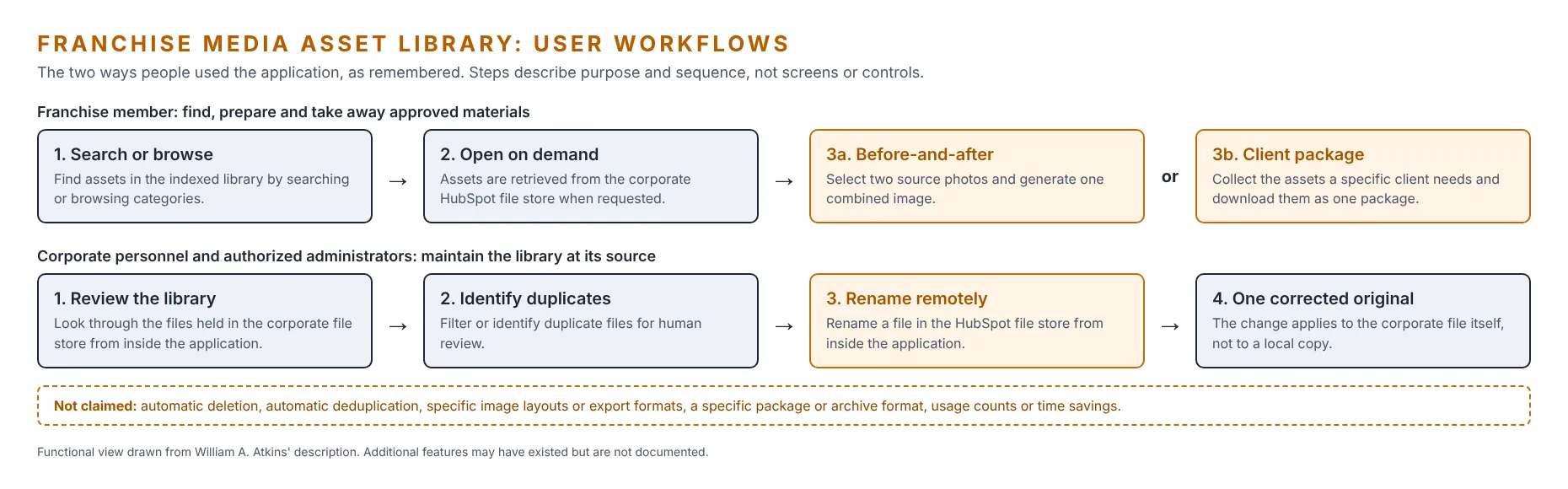
Franchise member workflow
Section titled “Franchise member workflow”- Search or browse. Find assets in the indexed library by searching or browsing the collection.
- Open on demand. The application retrieves the selected asset from the corporate HubSpot file store when it is requested.
- Prepare it for use. Depending on the task, either:
- Create a before-and-after image by selecting two source photographs and generating one combined image, or
- Build a client package by collecting the assets a specific client needs and downloading them together as a package.
Corporate and administrator workflow
Section titled “Corporate and administrator workflow”- Review the library through the application.
- Identify duplicates by filtering or flagging duplicate files for human review.
- Rename remotely by correcting a file’s name in the HubSpot file store from inside the application.
- Keep one corrected original. The rename applies to the corporate file itself rather than to a local copy.
Workflow level of detail
These workflows describe purpose and sequence as remembered. Screen layouts, menus, filters, and button-level steps are not documented and are not shown.
5. Key Capabilities
Section titled “5. Key Capabilities”Search and self-service access
Section titled “Search and self-service access”Searchable media library. Users could browse and search an indexed collection of corporate media assets from a web browser.
- Why it mattered: franchise members could find approved collateral themselves instead of asking the corporate team.
- Not claimed: specific search features such as filters, tags, previews, or relevance ranking.
Asset categories in the library
Section titled “Asset categories in the library”| Asset category | What this kind of material is generally used for |
|---|---|
| Videos | Showing the service and its results in a format suited to presentations, websites, and social media |
| Sales brochures | Leave-behind and presentation material for prospective clients |
| Technical data sheets | Product and process specifications for clients, facility managers, and specifiers who need technical detail |
| Safety data sheets (SDS) | Standardized hazard and handling information for chemical products |
| Before-and-after photographs | Visual proof of results for proposals, marketing, and client conversations |
| Other marketing collateral | Additional approved materials held in the corporate store |
About the right-hand column
The left column lists the categories the library held. The right column is a general description of what each type of material is typically used for, not a record of how SaniGLAZE or individual franchises used them.
Integration with the corporate content system
Section titled “Integration with the corporate content system”On-demand asset access. The application retrieved assets from the existing HubSpot file store through an authenticated API integration rather than maintaining a separate media repository.
- Why it mattered: there was one official library, so franchise members worked from the same files the corporate team maintained.
- Not claimed: any particular caching strategy, a fully stateless design, or the absence of metadata. The confirmed constraint concerns the media files themselves.
Content creation and file generation
Section titled “Content creation and file generation”Before-and-after image creation. Users selected two different source images and created a single combined before-and-after image.
- Why it mattered: franchise members could produce a ready-to-use comparison visual from approved photographs without leaving the library.
- Not claimed: the image-processing method, layout options, labels, branding, or export format.
Client-specific media packages. Franchise members assembled a collection of assets for a particular client and downloaded it as a package.
- Why it mattered: preparing materials for a client became one assembly step and one download instead of a series of separate file hunts.
- Not claimed: the archive format, package configuration, saved packages, or delivery method beyond the download itself.
Administration and library governance
Section titled “Administration and library governance”Duplicate-file identification. Corporate personnel or authorized administrators could filter or identify duplicate files through the application.
- Why it mattered: duplicates make a library harder to search and raise the chance of someone using the wrong version.
- Not claimed: automatic deletion or automatic deduplication. The capability supported human review.
Remote file renaming. Authorized corporate personnel or administrators could rename files in the corporate HubSpot file store through the application.
- Why it mattered: names could be corrected at the source, which kept the library consistent for everyone using it.
- Not claimed: how the integration was authenticated or configured. This is described as a remote administrative capability only.
Capability summary
Section titled “Capability summary”| Capability | Primary users | Group | Acts on |
|---|---|---|---|
| Searchable media library | All users | Search and self-service | Index of corporate assets |
| On-demand asset access | All users | Integration | Corporate HubSpot file store (read) |
| Before-and-after image creation | Franchise members | Content creation | Two selected source images |
| Client-specific media packages | Franchise members | File generation | A user-selected set of assets |
| Duplicate-file identification | Corporate personnel, administrators | Governance | Files in the corporate store |
| Remote file renaming | Authorized corporate personnel, administrators | Governance | Corporate HubSpot file store (write) |
Documented features only
The capabilities above are the ones I currently recall. The application may have included additional features, and they will be added here only once they are confirmed.
6. Architecture and Technical Highlights
Section titled “6. Architecture and Technical Highlights”The architecture is documented at the level the available evidence supports. Where a detail is unknown, this page describes the pattern and says so, rather than naming a technology.
Architectural pattern
Section titled “Architectural pattern”The application was a search and access layer over an existing corporate content system. Users worked in a browser; the application ran on a hosted server; the media lived in the corporate HubSpot file store and was reached through an authenticated API.
Layer-by-layer view
Section titled “Layer-by-layer view”| Layer | What is established | What is not documented |
|---|---|---|
| Application interface | Browser-based; used by franchise members, corporate personnel, and administrators | Framework, page design, screen layouts |
| Application server | Ran on a hosted server | Language, backend framework, hosting provider |
| API integration | Authenticated API integration with the corporate HubSpot file store, used to retrieve assets and to rename files | Integration library, authentication method, endpoints, configuration (intentionally excluded) |
| Authentication and authorization | Administrative functions were for authorized corporate personnel and administrators | How users signed in and how roles were enforced |
| Data storage and persistence | Media files were not stored as a separate, persistent copy in the application | Whether a database or persistent metadata index existed; any caching |
| File handling and processing | Combined two images into one before-and-after image; assembled selected assets into a downloadable package | Image-processing method, output formats, archive format |
| Background jobs or automation | None documented | Whether indexing or other work ran on a schedule |
| Hosting and deployment | Hosted server | Provider, deployment process, environments |
| Security boundaries | Internal application, not publicly accessible; credentials and configuration are kept out of this case study | Specific controls in the original code |
| Error handling and reliability | None documented | Logging, monitoring, testing, error handling |
Technical highlights
Section titled “Technical highlights”- A layer over an existing platform. The application was built around SaniGLAZE’s HubSpot environment. It did not replace HubSpot or create a competing content system.
- The source system kept the media. Media files stayed in the corporate HubSpot file store and were retrieved on demand. This kept one authoritative library and avoided maintaining a duplicate media repository.
- Read and write paths. Most users read from the library through search, browsing, and downloads. Administrative renaming wrote changes back to the HubSpot file store, so a correction applied to the corporate original rather than to a local copy.
- Separated audiences. Franchise-facing features (search, before-and-after images, packages) were distinct from maintenance features (duplicate identification, renaming), which were intended for authorized corporate personnel and administrators.
- Generated outputs from approved inputs. Before-and-after images and client packages were built from assets already in the approved corporate library.
- Confidential details excluded. The HubSpot integration is described by its business function only. Authentication methods, credentials, endpoints, and configuration are intentionally left out.
7. Design Principles
Section titled “7. Design Principles”Build around the system of record, not beside it
The corporate HubSpot file store was already where the official assets lived. Building a layer in front of it, instead of a new library next to it, avoided the ongoing work and risk of keeping two copies in step.
Make self-service the easy path
If finding an approved asset is faster than asking for one, people use the approved asset. The searchable library put the corporate collection within reach of every franchise member with a browser.
Fix data where it lives
Remote renaming applied corrections to the corporate file itself. A fix made once was a fix for everyone using the store.
Give the field tools, keep governance central
Franchise members got creation tools (before-and-after images, client packages), while maintenance tools (duplicate identification, renaming) were reserved for authorized corporate staff.
Support decisions, don't automate them away
Duplicate handling was built to identify and filter duplicates for people to review, not to delete files automatically.
8. Business Impact
Section titled “8. Business Impact”The application was designed to deliver the operational benefits below. They describe its purpose and intended value.
Intended benefits, not measured results
Beyond nationwide use by the franchise network, no usage, adoption, or time-savings measurements are available for this application, and none are claimed. There are no percentages, dollar figures, processing times, user counts, or adoption rates on this page.
Demonstrated scope
Section titled “Demonstrated scope”The application was put into use by SaniGLAZE International’s franchise network nationwide. That is the extent of the demonstrated result claimed here: no user counts, download volumes, time savings, or cost figures were recorded for this case study.
Intended operational benefits
Section titled “Intended operational benefits”- Faster access to approved collateral, through self-service search instead of requests to the corporate team.
- Self-service for a distributed network, so franchise members could get what they needed when they needed it.
- No duplicate media repository, because files remained in the corporate HubSpot file store.
- Better use of an existing platform, by extending the reach of the company’s HubSpot file store instead of buying or building a separate library.
- Before-and-after visuals created inside the library, from the same approved photographs.
- Simpler preparation of client-specific materials, assembled and downloaded as one package.
- Better library maintenance, through duplicate identification and remote renaming.
- More consistent materials, because everyone worked from one maintained library.
- Less friction across the cycle of locating, distributing, and managing marketing collateral.
Intended value by stakeholder
Section titled “Intended value by stakeholder”| Stakeholder | Intended value |
|---|---|
| Franchise members | Find approved materials without waiting; produce before-and-after images and client packages themselves |
| Corporate marketing | Serve the network from the existing library without maintaining a second one |
| Authorized administrators | Keep the shared store clean with duplicate identification and corrections at the source |
| The organization | Better use of existing systems and more consistent marketing materials across the franchise network |
How impact could be measured
Section titled “How impact could be measured”If the application, or a successor to it, were evaluated, these measures would show whether the intended benefits were realized. No values are reported because none were recorded for this case study.
| Measure | What it would show |
|---|---|
| Active users by group | Whether franchise members and corporate staff adopted the tool |
| Searches and downloads | How often the library was used to find and retrieve assets |
| Before-and-after images created | Use of the image-creation tool |
| Client packages downloaded | Use of the packaging tool |
| Asset requests to the corporate team | Whether self-service reduced manual requests |
| Duplicates identified and resolved | Progress in cleaning up the shared store |
| Files renamed | Volume of naming corrections made at the source |
9. My Contribution
Section titled “9. My Contribution”- Defined the application’s purpose, users, and feature set around the needs of franchise members and the corporate team.
- Set the core architectural constraint of leaving media in the existing HubSpot file store and retrieving it on demand.
- Designed the user workflows for search, before-and-after image creation, client packages, and administrative maintenance.
- Separated franchise-facing tools from administrative tools reserved for authorized personnel.
- Planned the HubSpot integration around its business functions: retrieving assets, identifying duplicates, and renaming files.
- Directed and carried out implementation through an AI-assisted development workflow with OpenAI Codex.
| Discipline | How it shows up in this project |
|---|---|
| Requirements definition | Turned the needs of three user groups into a defined set of capabilities |
| Workflow design | Designed the franchise and administrator workflows end to end |
| Architecture decisions | Chose to build on the existing content system and keep media at the source |
| Integration planning | Defined what the HubSpot integration needed to do, read and write |
| Implementation | Built the application through an AI-assisted development workflow |
| Business alignment | Tied every feature to an objective: access, self-service, no duplication, client preparation, or maintenance |
10. Technology Stack
Section titled “10. Technology Stack”| Component | Status |
|---|---|
| OpenAI Codex (AI-assisted development workflow) | Confirmed |
| HubSpot file store (existing corporate content system, integrated through an authenticated API) | Confirmed |
| Hosted server | Confirmed; provider not documented |
| Web browser as the user interface | Confirmed; frontend technology not documented |
| Programming language, frameworks, libraries, database | Not documented |
Developed through an AI-assisted software development workflow using OpenAI Codex. The original implementation stack is not independently documented.
11. Confidentiality and Public Documentation
Section titled “11. Confidentiality and Public Documentation”This page describes my own design and development work. It is not a disclosure of SaniGLAZE International’s confidential information, and it does not claim ownership of the company’s data, its HubSpot platform, or its intellectual property.
Deliberately excluded from this page:
- Any URL for the original internal application.
- Credentials, service keys, tokens, and authentication configuration.
- HubSpot endpoints, account details, and integration configuration.
- Source code, proprietary or otherwise.
- Franchise names, franchise records, customer records, and employee information.
- The company’s media files, documents, and internal business records.
- Performance, security, scalability, reliability, or adoption claims that cannot be supported.
Integration described by function
The HubSpot integration is described only by what it did for the business: retrieving assets, supporting duplicate review, and renaming files. How it was authenticated and configured is intentionally left out.
12. Project Status and Verification Notes
Section titled “12. Project Status and Verification Notes”- Internal application. It was not publicly accessible, and no public demonstration or live link exists.
- Reconstructed from recollection. The original source code, hosting environment, and configuration are no longer available to me. No screenshots, recordings, or Codex development logs of the original application survive, so the diagrams on this page are functional illustrations rather than captures of the application.
- Documented features only. The capabilities on this page are the ones I currently recall. The application may have included additional features that are not documented here.
- Current status unknown. The application’s present operational status is not known, and this page does not imply it is still running.
Verification ledger
Section titled “Verification ledger”| Statement | Status |
|---|---|
| Internal application for SaniGLAZE International franchise members, corporate marketing personnel, and authorized administrators | Confirmed by project description |
| Built in 2026 by William A. Atkins while Vice President of Marketing at SaniGLAZE International | Confirmed by William A. Atkins |
| Used by the franchise network nationwide | Confirmed by William A. Atkins |
| Built with OpenAI Codex as an AI-assisted development workflow | Confirmed by project description |
| Browser-based, running on a hosted server | Confirmed by project description |
| Media files remained in the corporate HubSpot file store; no separate persistent media copy | Confirmed by project description |
| Assets retrieved through an authenticated API integration and presented through a searchable index | Confirmed by project description |
| Asset categories: videos, sales brochures, technical data sheets, SDS, before-and-after photos, other collateral | Confirmed by project description |
| Before-and-after image creation from two selected images | Confirmed by project description |
| Client-specific packages assembled and downloaded | Confirmed by project description |
| Duplicate-file filtering or identification for corporate personnel and administrators | Confirmed by project description |
| Remote renaming of files in the HubSpot file store by authorized personnel | Confirmed by project description |
| Language, frameworks, libraries, hosting provider, deployment process | Not documented |
| Authentication and authorization implementation | Not documented |
| Database, metadata index persistence, caching | Not documented |
| Image-processing method, package format | Not documented |
| Logging, monitoring, testing, error handling | Not documented |
| Numbers of users, assets, franchises, and administrative operations | Not documented |
Proposed reconstruction is separate
A proposed technical reconstruction of how these capabilities could be implemented appears near the end of this page, under Proposed Technical Reconstruction — Not Historically Verified. It is a reference design, not a record of the original application.
13. What This Project Demonstrates
Section titled “13. What This Project Demonstrates”| Capability | Evidence in this project |
|---|---|
| Identifying operational inefficiencies | Saw the friction in locating, distributing, and maintaining collateral across a franchise network |
| Translating requirements into software | Turned the needs of three user groups into a working internal application |
| Using AI-assisted development | Built the application through an AI-assisted workflow with OpenAI Codex |
| Integrating with existing business platforms | Built on the corporate HubSpot file store instead of replacing it |
| Automating repetitive work | Packaged before-and-after image creation and client-package assembly into self-service tools |
| Improving access to information | Put the corporate media library within reach of franchise members through a browser |
| Supporting distributed teams | Served a nationwide franchise network from one central library |
| Executive ownership of a business system | Defined, built, and put into nationwide use a tool for the organization I led marketing for |
| Administrative control and governance | Gave authorized staff duplicate identification and remote renaming at the source |
14. Potential Enhancements (Proposed, Not Historical)
Section titled “14. Potential Enhancements (Proposed, Not Historical)”Proposed features only
The ideas below are possible future enhancements. They are not features of the original application and are listed only to show how the platform could grow.
| Proposed enhancement | Purpose |
|---|---|
| Usage reporting by asset and by user group | Show which materials the network relies on and which go unused |
| Version and review-date flags | Highlight assets, such as safety data sheets, that need periodic review |
| Saved package templates | Reuse common client packages for recurring types of work |
| Optional branded before-and-after layouts | Keep comparison images consistent with brand standards |
| Asset request form | Let franchise members ask for materials the library does not have |
| Rename and maintenance history | Record administrative changes for accountability |
15. Glossary
Section titled “15. Glossary”| Term | Meaning on this page |
|---|---|
| Media asset library | A searchable collection of marketing files such as videos, documents, and photos |
| HubSpot file store | The file storage in SaniGLAZE International’s HubSpot environment, where the corporate media lived |
| Authenticated API integration | A connection that lets one application work with another system’s data after proving it is allowed to |
| Single source of truth | One official location for each file, rather than several copies that can drift apart |
| Safety data sheet (SDS) | A standardized document with hazard and handling information for a chemical product |
| Technical data sheet | A document describing a product’s specifications and performance characteristics |
| Client-specific media package | A set of assets chosen for one client and downloaded together |
| AI-assisted development workflow | Building software with an AI coding tool assisting implementation, under human direction |
Proposed Technical Reconstruction — Not Historically Verified
Section titled “Proposed Technical Reconstruction — Not Historically Verified”Read this first
Everything in this section is a proposed reference design: one coherent way the remembered capabilities could be built. It is not a description of the original application’s code, stack, hosting, or configuration, none of which survive. Technology names below are examples of suitable options, not claims about what was used. Nothing here should be read as a historical fact.
Evidence ledger behind the reconstruction
Section titled “Evidence ledger behind the reconstruction”| Category | What falls in it |
|---|---|
| Confirmed | Internal application for franchise members, corporate marketing personnel, and authorized administrators; built in 2026 with OpenAI Codex; browser-based on a hosted server; media kept in the corporate HubSpot file store with no persistent copy; authenticated API integration; searchable index; the six remembered capabilities; nationwide franchise use |
| Inferred | Some form of metadata listing or index supported search; administrative features were restricted to certain users in some way; the API credential was held by the application rather than by each user |
| Unverified | Language, frameworks, libraries, hosting provider, deployment; authentication and authorization implementation; database, index persistence, caching; image-processing method and output format; package format; logging, monitoring, testing, error handling; user, asset, and operation counts |
Proposed reference architecture
Section titled “Proposed reference architecture”| Component | Proposed design | How it respects the confirmed constraints |
|---|---|---|
| Browser client | One web interface with library search and browse (filters by asset type and folder), asset preview, a client-package selection tray, a before-and-after composer, and an administrator area | Keeps the experience browser-only for franchise members |
| Application server | A small backend service (for example Node.js with TypeScript, or Python) exposing internal routes for search, retrieval, package generation, duplicate reports, and rename requests | Holds the integration credential server-side so it never reaches a browser |
| HubSpot integration | A server-held API credential limited to file permissions, used to list and search files, obtain file access links, and update file names through HubSpot’s file API, with pagination and retry with backoff for rate limits | Matches the confirmed read (retrieve) and write (rename) paths |
| Metadata index | A lightweight index of file metadata only (ID, name, folder, type, size, last modified), refreshed on a schedule or on demand, held in memory or a small database such as SQLite; categories derived from folder and file type | Supports search without storing any media bytes |
| Asset delivery | Short-lived access links from HubSpot, or streaming through the server without writing to permanent storage | Preserves the no-duplicate-library constraint |
| Before-and-after composer | Browser-side compositing with the HTML canvas: two images side by side or stacked, optional “Before” and “After” labels, exported as JPEG or PNG; a server-side alternative would use an image library such as Sharp or Pillow | Builds outputs from approved library images |
| Client package builder | The server fetches the selected files and streams them into a ZIP archive during download, optionally with an index sheet of contents; any temporary files are deleted after delivery | Delivers one package without keeping copies |
| Duplicate identification | A report grouping likely duplicates by normalized name, matching size, and, where needed, a content hash computed on demand | Human review only; nothing is deleted automatically |
| Remote rename | An administrator-only action that validates the new name (allowed characters, extension unchanged, no collision), calls the update operation, refreshes the index entry, and records who renamed what and when | Writes the correction to the corporate original |
| Access control | Sign-in for every user with at least two roles, franchise member and administrator, enforced on the server rather than only hidden in the interface; single sign-on would be an option | Matches the confirmed separation of franchise and administrative tools |
| Hosting and operations | Any host that runs the backend over HTTPS, with secrets in environment variables, logging that excludes personal data, a health check, and alerts on repeated integration failures | Keeps credentials and personal data out of logs and code |
Recommended verification checklist for a rebuild
Section titled “Recommended verification checklist for a rebuild”| Check | Expected result |
|---|---|
| Search | Correct results by file name and asset type |
| Delivery | Downloads come from HubSpot, and no media is written to permanent server storage |
| Before-and-after | Correct output for mixed portrait and landscape images |
| Packages | Archives open and contain exactly the selected files |
| Duplicates | Known duplicates are flagged, and nothing is deleted |
| Rename | Succeeds for administrators, is refused for franchise users, and appears in HubSpot |
| Credentials | No credential is ever exposed to the browser |
Unverified
This checklist describes how a rebuild should be verified. It is not a claim that the original application was tested this way.
Related SaniGLAZE Work
Section titled “Related SaniGLAZE Work”- SaniGLAZE Video End-Slide Generator: another Codex-built self-service tool for the same franchise network, focused on localized marketing video.
- SaniGLAZE Web Privacy & Tracking Audit Platform: a Codex-built auditing application that scanned the organization’s corporate web properties for trackers, cookies, and consent-related concerns.
- SaniGLAZE Opportunity Map and SaniGLAZE Trade Show Map: business-systems dashboards for the same organization.
- SaniCONNECT Private Franchise Collaboration Platform: a private WordPress-based community I built and launched in Spring 2024 for the SaniGLAZE franchise network, technicians, sales members, and corporate leadership, with more than 40 members.
Changelog
Section titled “Changelog”Published the Proposed Technical Reconstruction — Not Historically Verified section with William's approval: evidence ledger, proposed reference architecture, and a verification checklist for a rebuild, all labelled as a reference design rather than the original implementation.
Rollback: Revert the commit that added this section.
Status set to Delivered and start date to Spring 2026.
Rollback: Revert the commit that made this change.
Added confirmed facts from William: built in 2026 while Vice President of Marketing at SaniGLAZE International, and used by the franchise network nationwide.
Rollback: Revert the commit that added these facts.
Expanded to full detail at William's request: executive summary, Codex role table, user-group problem table, user workflows, per-capability detail with explicit "not claimed" notes, layer-by-layer architecture table, design principles, stakeholder value and measurement framework (no values), confidentiality list, verification ledger, proposed enhancements (labelled as proposed), glossary, and two functional diagrams.
Rollback: Revert the commit that expanded this page.
Case study first published from William's description of the application, following the Signal & Systems documentation standard: confirmed capabilities only, no implementation stack, metrics, or integration details.
Rollback: Revert the commit that added this page.